Blog
AI-Powered Production Monitoring: How Computer Vision Creates Real-Time Factory Visibility
By Rakesh· October 9, 2026· 14 min read
Summarize this post with

Loading insights...
LoadingSummarize this post with
Your dashboard says every machine is green, yet your line is still falling behind. This guide shows how computer vision turns the cameras you already have into real-time production monitoring, catching bottlenecks, idle stations, and defects that machine data can't see. Learn what it can detect, what to look for in a vendor, and how to test it with a single-line proof of concept.
It's 10:40 on a Tuesday. Line 3 is 60 units behind target, and the shift supervisor checks the dashboard. Every machine shows green.
What the dashboard doesn't show: cartons are stacking up at the case packer, an operator at station 4 has been waiting on components for 12 minutes, and a labeling issue is sending every fifth unit back for rework. A manufacturing monitoring system built on machine data alone can't see any of it.
That's the gap most production plants live with. Machines report their own status. The floor between them, where people, parts, and products move, stays mostly invisible until someone walks over and looks.
It adds computer vision on top of your existing video surveillance solutions, so cameras watch production activity continuously and flag the events your team has defined as worth acting on.
This guide covers how it works, what it can detect, what to look for in a vendor, and how to test it without overhauling your factory.
Not sure if your cameras are up to the job? A proof of concept can test one specific monitoring use case on your own footage before you commit to a wider rollout.
A manufacturing monitoring system is any setup that tells your team what's happening in production and alerts them when something goes off plan. It pulls together production data, visual information, and alerts so people can respond while the problem is still small.
A good one helps you keep watch over:
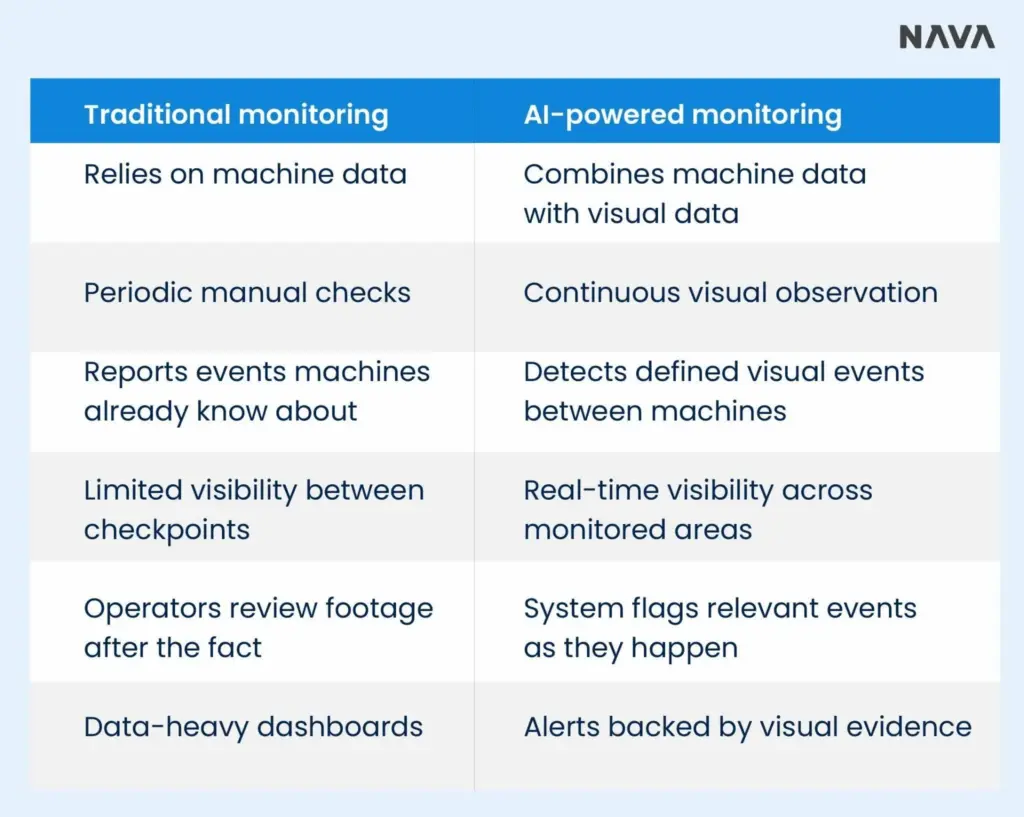
One point matters here. Computer vision doesn't replace your MES, PLCs, SCADA, or sensors. It fills in what those systems can't see.
Every minute between a problem starting and someone noticing it costs output. Here's where that delay comes from.
1. Production dashboards don't show everything
Machine data tells you whether equipment is running. It can't tell you why a running line is still underperforming.
A PLC won't report:
These are the problems that eat into OEE while every screen says things are fine.
2. Manual floor checks don't scale
Most plants fill the gap by having supervisors walk the floor or pull up CCTV. Both have limits.
| Manual method | Where it falls short |
| Floor walks | Happen at intervals, so issues between rounds go unseen |
| Supervisor coverage | One person can't watch a large facility at once |
| CCTV review | Footage gets checked after an incident, not during it |
| Operator reports | Observations vary from person to person and shift to shift |
3. Delayed visibility makes root-cause analysis harder
Every production loss follows the same chain:
The faster the first three steps happen, the easier the last two get. When detection takes hours and evidence means digging through a full shift of video, root-cause analysis turns into guesswork.
The system follows four steps: capture, analyze, detect, and alert. None of it requires your team to become data scientists.
1. Cameras capture production activity
The system starts with video from the floor. That can be your existing CCTV or IP cameras, or a few industrial cameras placed where coverage is missing.
2. AI models analyze what happens in the frame
Computer vision models are trained or configured to recognize specific things in the camera view. Common examples:
| What the model recognizes | Example on the floor |
| Product presence | A unit has arrived at the inspection station |
| Worker presence | Station 4 is staffed or unattended |
| Material movement | A pallet moved from staging to the line |
| Queue buildup | More than six cartons waiting at the packer |
| Process completion | A seal step finished before the next stage |
| Defects | A dented can or a missing cap |
| Equipment states | A conveyor stopped or a guard left open |
| Safety conditions | A person inside a restricted zone |
3. The system detects defined production events
This is where the value sits. Instead of saving hours of video for someone to review, the system watches for the events you've defined and logs each one when it happens.
4. Alerts and visual evidence reach the right team
Each detected event can feed into:
The goal isn't to watch more videos. It's to turn video into production information your team can act on. Purpose-built platforms such as NAVA Vision AI are designed around exactly this idea. Here's how it works on a real factory floor
NAVA Vision AI applies computer vision to the cameras you already run. The aim is simple: give operations teams visibility into the floor without a new hardware project.
Most plants already record hours of footage that nobody watches. NAVA Vision AI connects to existing CCTV, IP, and RTSP cameras and converts what they see into structured production events.
That means a camera stops being a recording device you check after something goes wrong. It becomes a source of time-stamped, searchable data about what happened at each station.
NAVA focuses on the events operations teams lose output to:
| Use case | What NAVA watches for |
| Production bottlenecks | Congestion and slow flow at specific stations |
| Material movement | Whether materials reach the line on time |
| Workstation activity | Staffed, active, or idle stations |
| Process deviations | Missed or out-of-sequence steps |
| Product and packaging defects | Visible damage, missing parts, label issues |
| Downtime and idle conditions | Stoppages and unexplained gaps |
| WIP accumulation | Inventory building between stages |
Integration risk is often the first objection heard, and it's a fair one. NAVA Vision AI is built to sit alongside your MES, PLC, SCADA, and ERP systems, not replace them.
Visual events can flow into the dashboards, notification tools, and records your team already uses. Your existing camera infrastructure stays in place.
NAVA Vision AI is also available through AWS Marketplace for teams that want to buy through existing procurement channels.
You don't need to roll computer vision solutions out across the whole plant on day one. Start with one measurable production problem, test detection accuracy under real operating conditions, and decide from the results.

What Can AI Manufacturing Monitoring Detect?
The short answer: anything a person could spot by watching the camera feed, as long as you can define it clearly. Here are the five areas where plants get the most use.
1. Production bottlenecks
Bottlenecks rarely announce themselves on a dashboard. Vision monitoring can identify:
Because each event is tied to a camera and a time, you can see where flow slows down and how often, not just that output dropped.
2. Downtime and idle time
Machine logs capture equipment faults. They miss the quieter losses. Computer vision can detect:
3. Process deviations
Some processes depend on steps happening in a fixed order. Computer vision can check whether each defined step occurs in sequence, or flag when a required condition is missing, such as a fixture not in place before assembly starts.
4. Quality issues
Depending on camera position and resolution, vision models can catch:
| Defect type | Example |
| Missing components | A screw or clip absent from an assembly |
| Incorrect assembly | A part installed upside down |
| Packaging defects | A torn seal or crushed carton |
| Surface defects | Scratches, dents, or discoloration |
| Product damage | Breakage during handling |
| Label or placement issues | A skewed or missing label |
5. Material flow and workstation activity
Flow problems often start upstream of where they show up. Vision monitoring can track whether materials reach stations, whether products move between stages, whether workstations stay active, and where WIP builds up when it shouldn't.
Not every vendor demo reflects what works on a real floor. Use these seven capabilities as your evaluation checklist.
1. Real-time event detection
The system should flag events as they happen. Historical analysis is useful, but it won't help the supervisor whose line is backing up right now.
2. Configurable monitoring rules
Every plant defines "a problem" differently. Your team should be able to set what counts as an event, such as how many cartons make a queue or how long an idle period lasts before it triggers an alert.
3. Visual evidence
Each alert should come with the clip or frame that triggered it. That lets your team confirm the event and start investigating in seconds instead of searching hours of footage.
4. Multi-camera monitoring
One camera on one line makes a good pilot. A production rollout needs to handle many cameras across lines, stations, and sometimes sites.
5. Integration with existing systems
Ask each vendor how the system connects with:
| System | Why it matters |
| MES | Ties visual events to work orders and output |
| ERP | Links production events to planning and inventory |
| SCADA and PLC data | Pairs what machines report with what cameras see |
| Existing cameras | Avoids a hardware replacement project |
| Notification systems | Routes alerts through tools people already use |
Managers should be able to search for "every idle event at station 4 last week" and get results. Scrolling through continuous video isn't monitoring.
Some plants have strict data, latency, or connectivity requirements. Ask where video gets processed, what data leaves the facility, and what happens when the network drops.
The biggest implementation mistake is trying to monitor everything at once. A phased approach keeps risk low and gives you proof before you spend more.
Pick one line, workstation, or process where better visibility would produce a measurable result. Good candidates are the station that causes the most downtime or the step with the highest rework rate.
Check whether your current cameras give you:
If one of these is missing, a single added camera is often enough.
Write a short list of detection rules. Three to five is a good start. "Alert when more than eight cartons queue at the packer for over two minutes" is a rule. "Watch for problems" is not.
Test the system against real production conditions, using historical footage, live feeds, or both. This is where you find out what works in your lighting, your layout, and your pace.
Operators know the floor better than any model. Have them confirm whether detected events match what happened, and adjust the rules where they don't.
Once the first use case proves its value, extend monitoring to other lines, stations, or facilities. Each new use case goes faster because the setup and integrations are already in place.
In many cases, yes. Whether it works depends on camera position, resolution, lighting, and what you're asking it to detect. Spotting a queue of cartons needs far less detail than spotting a hairline scratch.
Does computer vision replace MES or SCADA?
No. Computer vision solutions for manufacturing complement MES and SCADA by adding visual production data that those systems can't capture. Your MES still tracks orders and output, while computer vision shows what's happening on the floor around them.
Yes. Multi-camera and multi-line deployments are common once a pilot proves out. Most plants start with one line, then add cameras and use cases line by line.
It depends on the use case, camera setup, environment, and how the model is trained. Be wary of any vendor that quotes a single accuracy figure before seeing your footage. The only reliable answer comes from testing on your own production video.
No. The deployment architecture determines what gets processed, what gets kept, and what gets discarded. Many plants keep only the clips tied to detected events.
There's no honest one-size answer. Timelines depend on the number of cameras, the integrations required, the number of use cases, and how much validation your team wants before going live.
You don't need to commit to monitoring the whole facility to find out if computer vision works for you. A focused POC answers the questions that matter before you spend on a full rollout.
A well-scoped POC tells you:
| POC element | What it looks like |
| One production use case | A single bottleneck, defect type, or idle-time problem |
| Defined detection events | A short, written list of what counts as an event |
| Camera footage | Existing feeds or sample footage from the target area |
| Accuracy benchmarks | Agreed targets for correct detections and false alerts |
| Event and alert workflow | Who gets notified, how, and what they do next |
| Baseline operational metrics | Current downtime, throughput, or rework figures to compare against |
| Success criteria | The result that would justify expanding |
A factory can have plenty of production data and still not know what's happening on the floor. Machines report their own status. The space between them is where output gets lost.
A computer-vision-powered manufacturing monitoring system adds the visual layer your current systems lack. It detects defined production events, attaches evidence to each one, and helps your team investigate problems while they're still fresh.
The practical starting point isn't monitoring everything. Choose one production problem, test it against real footage, measure the results, and expand from there.
Ready to see your own floor clearly? Contact the NAVA Vision AI team to scope a proof of concept.